
If your website runs on Cloudflare, a change that took effect on 15 September 2026 could be stopping Google and Bing from crawling your site, and you might not even be aware. If you have ever switched on Cloudflare’s “Block AI bots” setting, search engines such as Googlebot and Bingbot can now be caught by that same rule. The result can be lost rankings and reduced visibility in AI-powered search.
The good news: it takes about five minutes to check and fix.
What has Cloudflare changed?
On 1 July 2026, Cloudflare introduced a more granular way to manage automated traffic, splitting AI-related bots into three categories based on what they actually do on your site: Search, Agent, and Training crawlers. The aim was to give website owners finer control than a single on or off switch.
The change that matters most took effect on 15 September 2026. From that date, multi-purpose crawlers, specifically those that combine Search with Training, are allowed or blocked based on everything they do. Because Cloudflare applies the most restrictive setting that fits a bot, multi-purpose crawlers such as Googlebot, Applebot and BingBot will now be blocked for any site that has chosen to block Training, either through the new controls or the older “Block AI bots” service.
In simple terms, Googlebot, Bingbot and similar crawlers aren’t treated purely as search bots anymore. Cloudflare recognises that they can be used for both search indexing and AI-related functions, meaning a setting intended to block AI training could also prevent them from crawling your site.
The legacy “Block AI bots” toggle is being deprecated as part of the same update.
Why this matters for your SEO and AI visibility
If your Cloudflare settings are blocking these crawlers, there are two areas that could be affected:
The impact on traditional SEO
If Googlebot and Bingbot cannot crawl your pages, your content cannot be indexed or refreshed. Over time that means falling rankings, existing pages dropping out of the results, and new content never being picked up in the first place. For a business that relies on organic search for enquiries and sales, this can become a significant issue without necessarily being immediately obvious.
The impact on GEO (Generative Engine Optimisation)
Search is increasingly moving beyond a traditional list of links. Google now provides answers directly in the search results through features such as AI Overviews, alongside other AI-powered search experiences.
Being crawled allows your content to be discovered, cited and referenced across these experiences, including Google’s AI Overviews, Bing Copilot, ChatGPT and other generative tools.
If these crawlers are blocked, your content has less opportunity to appear in these AI-driven search experiences. As more people use AI to discover information, products and services, this could have an impact on your overall search visibility.
Importantly, you may not have changed anything recently. A setting that made sense when it was originally switched on can now behave differently following Cloudflare’s changes, which is why it’s worth checking your configuration.
Is your website affected?
You are most likely to be affected if your site is on Cloudflare and you enabled “Block AI bots”, or a Training block, at any point over the past couple of years. If your setting is “Do not block (allow crawlers)”, you are fine, but it is still worth confirming rather than assuming.
The check below takes only a few minutes.
How to check and fix it in three steps
If your site runs on Cloudflare, here is how to make sure multi-purpose bots can keep crawling and indexing your website.
Step 1: Check your AI bot setting
Log into your Cloudflare account and go to the Overview page for your domain. On the right-hand side there is a dropdown that controls what to block.

The “Manage AI bot access” panel on the domain Overview page.
Step 2: Open Security settings
If this is set to anything other than “Do not block (allow crawlers)”, go to Security and then Settings in the left-hand menu.
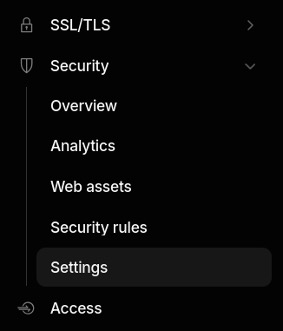
Security > Settings in the Cloudflare dashboard.
Step 3: Allow mixed-purpose crawlers
Under the “Bot traffic” section, select “Mixed purpose crawlers will continue to be allowed.”
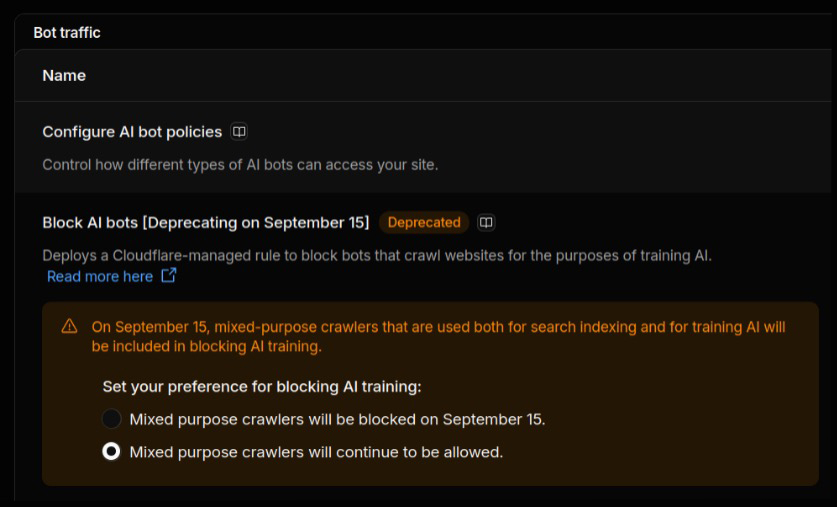
The “Bot traffic” setting that keeps Google, Bing and other multi-function bots free to crawl.
That final option confirms to Cloudflare that you want no changes applied to Training crawlers that also crawl for search, which keeps Googlebot, Bingbot and other multi-function bots free to do their job.
What if you do still want to block AI training?
Allowing mixed-purpose crawlers doesn’t mean you have to allow all AI-related traffic.
Cloudflare’s separate Search, Agent and Training controls give you more targeted options, so you can continue blocking pure Training crawlers while allowing the search bots you rely on. The important thing is to make sure your settings don’t unintentionally block the crawlers that help keep your site visible in search.
If you are unsure which settings apply to your site, it is worth checking before changing anything.
Not sure whether your site is affected?
Checking your Cloudflare configuration is a small job that protects months of SEO and GEO groundwork. If you would like us to review your setup and confirm your site stays discoverable in both traditional and AI-powered search, get in touch and we can help out.